
How to Install Hot Player on Firestick (2025 Easy Guide)

Learn how to install Hot Player on Firestick in 2025 with this step-by-step guide. Stream IPTV fast and securely with Hot Player and an active subscription.

How to Install Hot Player on Firestick (2025 Easy Guide)

1. What is Hot Player?

Hot Player is a powerful IPTV media player that supports streaming live TV, VOD, and series using M3U playlists or Xtream Codes. It doesn’t host any content on its own but is built for users who already have an IPTV subscription.

If you have IPTV from services like IPTV Prime Shop, Hot Player is a great app to use on your Firestick for smooth and reliable streaming.

2. Why Use Hot Player on Firestick?

Here are some reasons to choose Hot Player:

✅ Simple & modern interface

✅ Fast loading and minimal buffering

✅ Works with all major IPTV providers

✅ Supports Xtream Codes, M3U, and EPG

✅ Free to install and use

It turns your Firestick into a powerful IPTV device without needing a cable subscription.

3. What You Need Before Installation

Make sure you have:

Amazon Firestick or Fire TV device

Stable Wi-Fi connection

IPTV subscription (get one from IPTV Prime )

Downloader app installed on your Firestick

4. How to Install Hot Player on Firestick

4. How to Install Hot Player on Firestick

✅ Step 1: Enable Apps from Unknown Sources

Go to Settings on your Firestick

Select My Fire TV

Choose Developer Options

Enable Apps from Unknown Sources

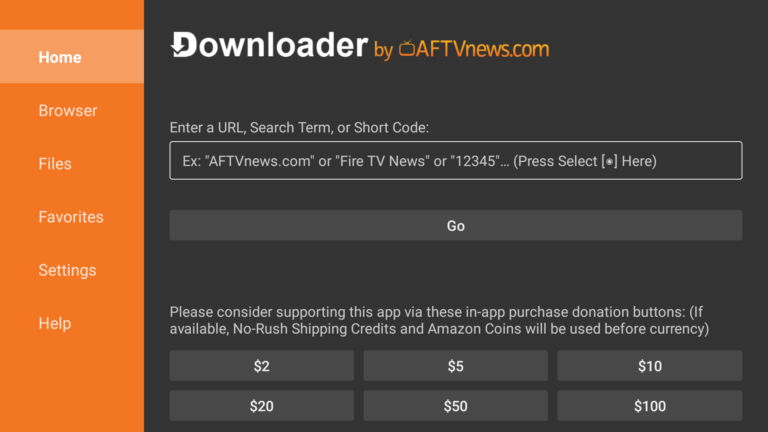
✅ Step 2: Install Downloader App

How to Install Hot Player on Firestick (2025 Easy Guide)

Option 1: Enter Direct URL

Open Downloader

In the URL bar, type:

https://hotplayer.pro/hot.apk

Click Go

Wait for the download to finish

Click Install

Once installed, click Done or Open

Option 2: Use Downloader Code (If available)

If a Downloader code like 123456 is provided (example), simply enter it in Downloader and follow the same steps.

5. How to Use Hot Player with IPTV

Launch the Hot Player app

Choose login method:

  • Xtream Codes
  • M3U URL

Enter your IPTV credentials (provided after purchase from IPTV Prime Shop)

Wait for the content to load

Start watching live TV, movies, and more!

6. Frequently Asked Questions (FAQs)

Is Hot Player free to use?

Yes, the app is completely free. You only need an IPTV subscription.

Get reliable IPTV from IPTV Prime. We support M3U and Xtream Codes.

Yes, it works on Android Smart TVs, Android TV Boxes, and smartphones.

Yes, as long as you download it from the official source and use a legitimate IPTV provider.

Hot Player works on:

Firestick & Fire TV

Android Smart TVs

Android TV Boxes

Android smartphones & tablets

🔸 It does not work on iPhones, iPads, LG webOS, or Samsung Tizen TVs.

It depends on your IPTV provider.
Most services allow 1 connection per subscription. Contact your IPTV provider or buy a multi-screen plan from IPTV Prime Shop.

7. Conclusion

Installing Hot Player on Firestick is one of the fastest ways to start streaming IPTV content without hassle. Whether you enjoy sports, movies, or international channels — Hot Player paired with a quality IPTV service like IPTV Prime offers everything you need.

🎬 Ready to stream?
👉 Order IPTV now and enjoy unlimited content with Hot Player!
Trending Guides

🎁 IPTV Free Trial 2025: Everything You Need to Know

Try IPTV risk-free in 2025! Learn how to request a 24h IPTV free trial, supported devices, and why IPTV Prime Shop is the #1 choice for premium streaming...
📥 How to Download IPTV Smarters on Firestick in 2025

Follow our expert 2025 guide to install IPTV Smarters on Firestick. Includes easy setup steps, activation, and optimization for the best IPTV experience...
How to Install XCIPTV Player on Firestick, Android TV & More

Discover how to install and set up XCIPTV Player on Firestick, Android TV, and more in 2025. From downloading the app to linking it with your IPTV Prime Shop subscription, this guide covers everything...